

Designing AI-powered video creation across platforms
I designed a unified creation experience that helps creators turn ideas, text, and existing media into videos across Web, Desktop, Mobile, and Tablet.
Project Overview
Timeline: 2023–2024
Platforms: Web, Mac, Windows, iOS, Android
Users: Individual creators and content professionals
Role: Senior Product Designer
Team: PM, CEO, AI Scientist, Engineering, and Designers
Impact
Designed experiences used by 1M+ creators and businesses
Led design for Visla 3.0
Unified Web, Desktop, and Mobile experiences
Built AI-native video creation workflows
Established reusable cross-platform design patterns
Product Context
Visla was originally built around recording and editing, requiring users to manage multiple steps before producing a finished video.
With generative AI, we saw an opportunity to rethink the workflow — allowing users to start with an idea or existing content and let AI create the first draft.

Understanding the Creation Journey
Users didn’t all start with the same thing. Some had only an idea, while others already had text, links, audio, images, or video. The opportunity was to support these different starting points and guide them into one shared outcome: an editable video draft.

User Pain Points
01 — No Clear Path to AI Creation
Visla’s existing experience was built around recording, importing, and editing existing media. Users lacked a clear way to start creating a video directly from an idea or other source content.
02 — AI Creation Was Complex and Unfamiliar
AI video generation introduced a new workflow. Users needed to understand what content to provide, what AI would generate, and how to review and refine the result without losing creative control.
03 — One Experience, Different Platforms
Users created and edited videos across Web, Desktop, Mobile, and Tablet, but different screen sizes and interaction patterns made it challenging to maintain a consistent creation experience.
Key Solutions
1. Introducing AI Creation
Visla was originally built around recording and editing existing media. I explored how AI creation could become a natural new entry point, allowing users to start with an idea or content while keeping the existing workflow familiar.
Before
Existing workflows required users to begin with media they already had.
After
New entry points supported multiple creation paths, all converging into one editing workflow.


2. Designing the AI Creation Experience
Users could start with an idea, text, link, audio, image, or video. I unified these inputs into one creation flow that guides users from initial content to an AI-generated first draft, then into editing and refinement.
Flexible Input
Guide AI with ideas and source content.
Editable Draft
Turn AI-generated content into a video ready to refine.


3. Creating a consistent experience across platforms
Users created and edited videos across web, desktop, tablet, and mobile devices, each with different screen sizes and interaction patterns. The experience needed to maintain a consistent creation flow while adapting naturally to the strengths and constraints of each platform.

Design Process
1. Understanding the Users

Small Businesses
Create marketing and social content with limited production resources.

Marketing Teams
Create marketing and social content with limited production resources.

Educational Trainers
Turn training and instructional content into video efficiently.
2. Understanding AI Capabilities & Limitations
We explored what AI could do, where it fell short, and how the experience could keep users informed and in control.

3. Defining the Creation Model
I defined a flexible creation model that could turn different types of user input into an editable video draft.
Flowchart - Idea to video

4. Exploring the experience
Adding “Create Video” feature into the video editing and recording platform


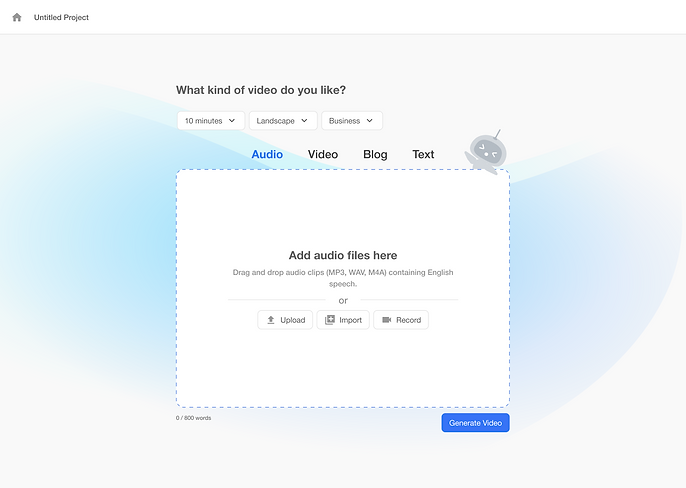
Exploring the creation entry point
I started with low-fidelity explorations to understand how multiple creation paths—idea, text, audio, images, and video—could come together in one entry point without overwhelming users.
Pain Points
Design Goals
Solution
Solution
Making AI requirements visible
As the workflow became more defined, we needed to make it clear what users could provide and how different inputs would influence the generated video. I explored ways to surface these options directly in the creation experience.
Learning: More visible options improved discoverability, but also introduced more decisions upfront.

Reducing friction through testing
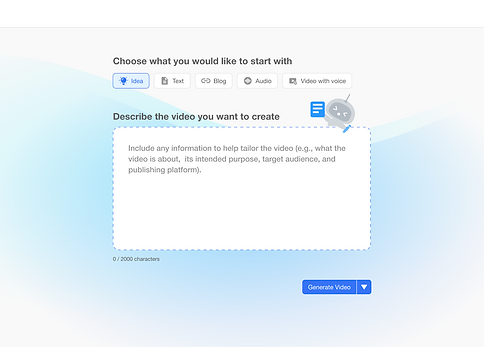
User testing revealed that although the interface looked simple, hiding source uploads behind an additional action made them harder to discover and added an unnecessary step to the creation flow.
Design response: We surfaced source inputs directly in the creation experience, allowing users to understand their options and add materials without an extra step.


Final — One flexible creation workflow
The final design brought multiple starting points into one unified experience. Users could begin with an idea or add existing source materials directly, while AI transformed those inputs into an editable video draft.

Cross-platform design
Adapting the Creation Flow for Mobile
The same AI creation flow was adapted for mobile, from starting a new video to generating and reviewing the first draft.


Scaling the experience across platforms
I designed a consistent creation model across Web, Desktop, Mobile, and Tablet, adapting layouts and interactions to different screen sizes and input methods.
Impact
1M+ users
Designed for Visla's growing creator and business user base
AI-native workflow
Expanded Visla from recording and editing into AI-assisted video creation
Cross-platform
Scaled across Web, Desktop, Mobile & Tablet
User Feedback
User feedback highlighted the value of making video creation faster and more accessible for people without traditional production experience.
