


T3 Go. Designing a safer ride-hailing experience for 3.2M users
Redesigned the core ride experience to improve trust, explain in-car safety systems, and make help easier to access.
Project Overview
Role: Product Designer
Platform: iOS / Mobile
Scope: Safety · Trust · Ride Experience
Impact: 3.2M users · 5-star rating
Team: PM · Engineering · Research
3.2M users: Rider platform
+15% bookings: Following launch
−8% cancellations: Following launch
5-star rating: App Store
Impact
Product Context
Unlike traditional ride-hailing services, T3 combined a mobile app with in-car safety infrastructure, including cameras and physical help controls. The challenge was making these safety features visible, understandable, and useful within the rider experience.
In-car camera

Physical safety controls

Research
To understand rider needs and safety concerns, I combined surveys, interviews, and competitive research to identify the biggest opportunities for the redesign.


Storyboard


Vivian always prefers to use the ride-hailing service at night.
She notices some unexpected behaviors from the driver and worries about her safety.
Calling 911 is an option, but maybe it is not the best choice.
User Pain Points
01 — Building trust before and during the ride
Riders were entering a car with a stranger and needed clearer ways to verify both the driver and vehicle before feeling confident about the trip.
02 — Making the safety system understandable
T3 had in-car safety technology, but riders did not always understand what it did or how to use it.
03 — Making help easy to access
When riders felt unsafe, they needed a fast, understandable way to get help without searching through complex options.
Key Solutions
01 — Surface identity and vehicle information
Make the driver's real photo, vehicle details, ratings, and rider feedback easier to verify at a glance.
02 — Explain safety features in context
Introduce the in-car safety system through onboarding and contextual reminders instead of expecting riders to discover it themselves.
03 — Create one clear “Get Help” entry point
Consolidate safety actions into a visible, centralized help experience during the trip.
Design Process
01 — Strengthening rider trust
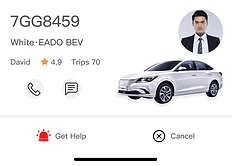
We replaced the illustrated driver avatar with a real photo, surfaced vehicle information, and reorganized the ride card so riders could verify the driver and car more quickly.
Original
After
Final (Day time)

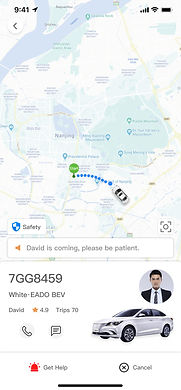

Cartoonish photo of the driver.
The rolling notification was too big and not optimally located.
Change driver's cartoonish photo to an actual photo.
Added the photo of the car.
Relocated notification to the bottom.
Change "Safety" to "Get help".
Combined photos of driver and car to create more space for the map.
Final (Night time)

Created the dark UI.
During our reach, we found out that 60% of the orders came in between 8:00 p.m. - 10:00 p.m.
By tapping the driver's profile, it would show the car information, the driver's rating, the riders' compliments, and the riders' feedback.
Original

After
Final


02 — Testing the night experience
Hypothesis
Since evening rides were strongly associated with safety concerns, we explored a darker visual treatment to signal a different nighttime context.
Testing
Usability testing showed that the dark interface did not improve perceived safety and instead created confusion.
Decision
We kept the familiar visual system and focused safety communication on clearer information and actions instead.
Dark UI
Normal UI


03 — Making safety features understandable and actionable
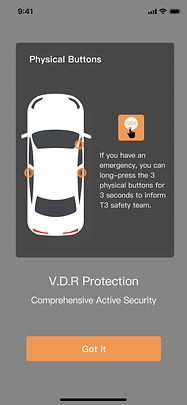
Explain the system: Onboarding + contextual reminder.
The problem: The customer couldn't understand the V.D.R safety system.
The goal: To educate the users about the V.D.R safety system on the onboarding pages.
If the rider encounters an emergency, he can press the physical button for 3 seconds, which will allow the T3 safety team to see what is happening in the car through the camera and control the car remotely.
Onboarding 1

Onboarding 2

Pop up

Physical button in the car

Camera in the car


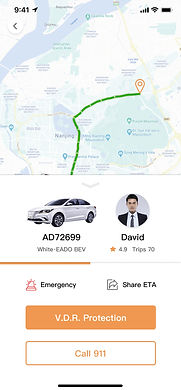
Provide clear action: Get Help
The problem: How to get more options for getting help?
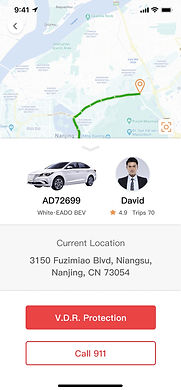
Same as tapping the "Get help" button to send voice and video via the camera in the car to T3 staff. Tapping the "Get help" icon would get emergency help for the rider or share ETA with three different groups.
Version 1
Logo color
Dark orange
Before User Testing
After User Testing

It is important to add the current location here during the trip.
The user could tell the helper immediately.
Alarm color
Red


Version 2 - Final
Get Help

Emergency Options
Share ETA
Sharing Options

Impact

